
The AI Cheat Sheet: 10 Tools Every Parent Should Know About
What they are, what they're good for, and which ones to watch out for.

If you’ve been hearing “AI” everywhere and quietly thinking I still don’t really know what any of these tools actually do, this is for you. You’re not behind. You’re normal.
I made this cheat sheet because every “AI explainer” I found assumed I already knew what a large language model was. I didn’t. You probably don’t either. And that’s fine.
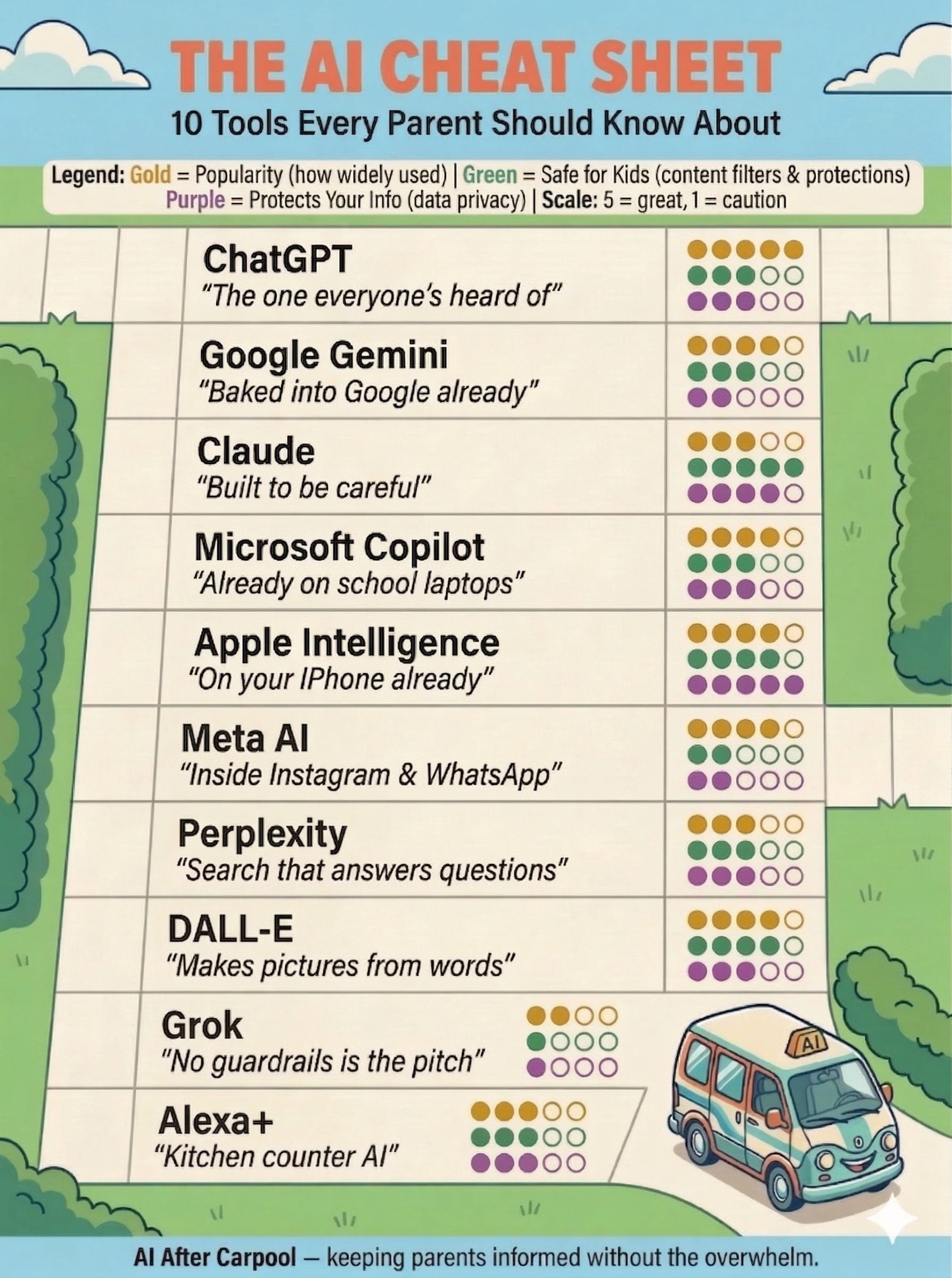
Ten tools. One line each. Rated on how popular they are, how safe they are for kids, and how well they protect your data. Bookmark this. Come back to it. I’ll keep it updated.
How to read the ratings: 1–5 scale. 5 = great. 1 = proceed with caution.
1. ChatGPT — OpenAI
The one everyone’s heard of.
Answer questions, write emails, help with homework, plan meals. If you only try one AI tool, this is probably it.
★★★★★ Popular | ★★★☆☆ Safe for Kids | ★★★☆☆ Protects Your Info
The real talk: Content filters exist but kids can get around them. Your conversations train their models unless you turn that off in settings.
2. Google Gemini
Baked into Google. You’re probably already using it.
Quick answers in search, email drafts in Gmail, trip planning. You’ll use AI without realizing you’re using AI.
★★★★☆ Popular | ★★★☆☆ Safe for Kids | ★★☆☆☆ Protects Your Info
The real talk: Google already knows a lot about you. Gemini feeds into that ecosystem. It’s everywhere. Which is the upside and the thing to watch.
3. Claude — Anthropic
Built to be careful. That’s literally their thing.
Explaining hard stuff simply, writing, thinking through decisions. Great when you actually want to trust the output.
★★★☆☆ Popular | ★★★★★ Safe for Kids | ★★★★☆ Protects Your Info
The real talk: Most safety-focused tool on this list. Doesn’t train on your conversations by default. Less well-known, but that’s changing.
4. Microsoft Copilot
If your kid has a school laptop, it’s probably already there.
Writing in Word, summarizing docs, quick answers in the Edge browser. Your family’s built-in AI if you’re in the Microsoft world.
★★★★☆ Popular | ★★★☆☆ Safe for Kids | ★★★☆☆ Protects Your Info
The real talk: School versions are more locked down than personal ones. If your kid uses Edge, Copilot is one click away.
5. Apple Intelligence
On your iPhone whether you asked for it or not.
Rewriting texts, cleaning up photos, summarizing notifications. Background AI that makes what you already do a little easier.
★★★★☆ Popular | ★★★★☆ Safe for Kids | ★★★★☆ Protects Your Info
The real talk: Most features run on your device, not in the cloud. Your data stays on your phone. Less powerful than ChatGPT, but the most private option here.
Quick gut check: If you've made it this far, you already know more about AI than most parents. Seriously. Keep going. The next five are the ones your kids are most likely using without telling you.
6. Meta AI
Inside Instagram, WhatsApp, and Facebook. Yes, really.
Quick questions while scrolling, image generation in DMs. Low-effort AI because it’s already where you are.
★★★★☆ Popular | ★★☆☆☆ Safe for Kids | ★☆☆☆☆ Protects Your Info
The real talk: This one makes me nervous. Your conversations can be used for ad targeting. It lives inside Instagram, where your kids are, with very little separation. Eyes wide open on this one.
7. Perplexity
Google search, but it actually answers your question.
Research anything and it shows you exactly where the info came from. Great for fact-checking and building critical thinking.
★★★☆☆ Popular | ★★★☆☆ Safe for Kids | ★★★☆☆ Protects Your Info
The real talk: The fact that it shows its sources is a huge win for teaching kids to verify what they read. Solid middle-of-the-road choice.
8. DALL-E / ChatGPT Images
Makes pictures from words. It’s wild.
School projects, birthday invitations, creative fun with kids. A great “create, don’t just consume” entry point to AI.
★★★★☆ Popular | ★★★★☆ Safe for Kids | ★★★☆☆ Protects Your Info
The real talk: Strong content filters and active child safety reporting. The tool is safe but the broader conversation about AI-generated images and deepfakes is the one worth having.
9. Grok — xAI
Elon’s AI on X. No guardrails is the selling point.
Unfiltered answers, trending topic summaries. Built to not sugarcoat things.
★★☆☆☆ Popular | ★☆☆☆☆ Safe for Kids | ★☆☆☆☆ Protects Your Info
The real talk: Designed to have fewer safety rails. For kids? Keep them away. It generates content other tools would refuse. A “know it exists, skip it” for families.
10. Alexa+ — Amazon
Your kitchen counter AI just got a lot smarter.
Smart home, timers, quick questions, shopping lists, bedtime stories. The AI your family uses without thinking about it.
★★★☆☆ Popular | ★★★☆☆ Safe for Kids | ★★☆☆☆ Protects Your Info
The real talk: Amazon keeps voice data by default. There’s a Kids+ mode, but the device is always listening. Review your settings, it takes two minutes.
The one thing to remember: No tool is perfect. Even the ones rated highest still need you paying attention. Think of these ratings like a seatbelt. Helpful, but not a replacement for watching the road.
The Bottom Line
You don’t need all of these. You don’t need most of them. But you should know they exist, because your kids do.
Pick one. Play with it. Then talk to your kids about what it can do, what it gets wrong, and why thinking before trusting matters.
I’ll keep this updated as things change.
Save this. Share it with a parent who needs it.
I’ll see you after carpool.
— Danielle